

When users visit your website, they expect a smooth, error-free experience. But sometimes, things break—pages disappear, servers overload, redirects fail, or permissions block access. These issues usually show up as HTTP errors, and if ignored, they can damage user experience, increase bounce rates, and harm your SEO performance.
This guide offers a deep, detailed, and easy-to-understand breakdown of the most common HTTP errors, including 404, 500, and more. Whether you’re a developer, IT professional, or business owner, this article will help you understand what these errors mean, why they occur, and how to fix them effectively.
What Exactly Are HTTP Status Codes?
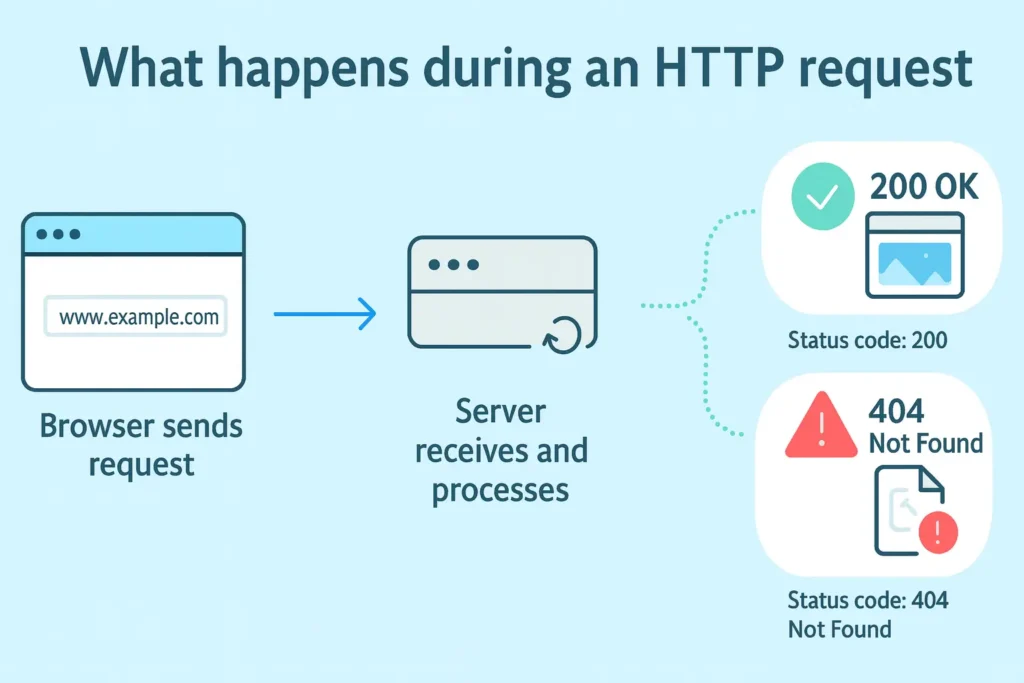
Every time a user clicks a link or loads a page, their browser sends a request to a web server. The server responds not only with content but also with HTTP response status codes—three-digit messages that describe the status of the request.
These codes fall under five major categories:
1xx – Informational
Indicates that the request has been received and is being processed.
2xx – Success
Confirms that the request was successful.
Example: 200 OK, the most common status code.
3xx – Redirection
Tells browsers that the requested page has moved.
Example: 301 Moved Permanently, used for SEO-friendly redirects.
4xx – Client Errors
Indicates an issue with the request—usually caused by broken links or missing pages.
The most common here is the 404 error.
5xx – Server Errors
Indicates that the server failed to complete the request.
The most frequent one is the 500 Internal Server Error.
While 2xx codes are good, and 3xx codes are manageable, 4xx and 5xx errors need urgent attention to maintain site stability and user satisfaction.
Most Common 4xx Errors and How to Fix Them
4xx errors occur on the client side, but often the root cause is still on the website itself—like outdated links, incorrect URLs, or missing files.
404 Error – Page Not Found
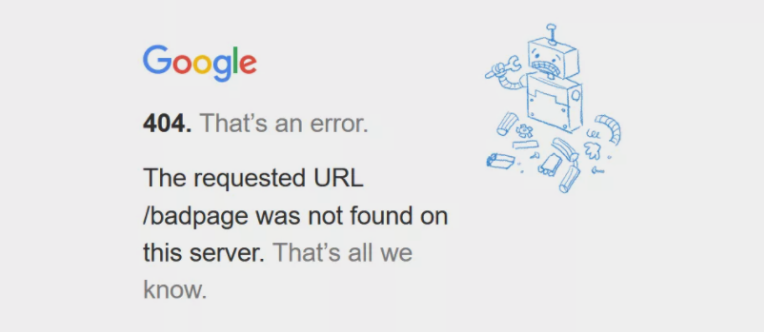
Why It Matters
- It hurts SEO by causing crawl issues.
- Users feel frustrated and leave the website.
- It creates a sense of poor maintenance or outdated content.
Deep Causes of 404 Errors
- You deleted a page without creating a redirect.
- Slugs or URLs were changed during a redesign.
- CMS updates changed the page structure.
- Manually-entered URLs contain typos.
- Linked pages from blogs or menus are outdated.
How to Fix the 404 Error (Step-by-Step)
1. Set Up 301 Redirects
Redirect users from an old URL to a new one.
This is critical for SEO and user experience.
2. Fix Internal Links
Sometimes your own site is pointing to a missing page.
Use tools like:
- Screaming Frog
- Ahrefs
- Search Console “Crawl Errors”
Fix every link pointing to the wrong URL.
3. Restore or Rebuild Content
If the deleted page was ranking well or important, restore it or create a modern version.
4. Create a Helpful Custom 404 Page
A custom 404 page should:
- Suggest related pages
- Include a search bar
- Show navigation menus
- Maintain brand styling
This reduces bounce rate and keeps users on your site.
403 Error – Forbidden
A 403 Forbidden error occurs when a user attempts to access a restricted page.
Deep Causes
- Incorrect file or directory permissions
- Misconfigured .htaccess rules
- Security plugins blocking access
- Hotlink protection enabled incorrectly
- IP restrictions set accidentally
How to Fix It
- Set correct file permissions (644 for files, 755 for folders).
- Regenerate your .htaccess file.
- Disable security plugins temporarily.
- Ask your host to check ModSecurity logs.
If your site uses a CMS like WordPress, even one misconfigured plugin can trigger this error.
401 Error – Unauthorized
This error appears when access requires authentication but the user doesn’t have valid credentials.
Fixing Steps
- Reset login credentials.
- Check password-protected directories.
- Verify API keys or tokens.
- Ensure proper configuration of your authentication module (OAuth, JWT, Basic Auth, etc.).
Most Common 5xx Errors and How to Fix Them
5xx errors indicate that the server is failing to process the request. These errors must be treated urgently because they can take the entire website offline.
500 Internal Server Error
This is a broad, general error, meaning the server encountered something unexpected.
Deep Causes
- Corrupted .htaccess file
- PHP configuration issues
- Plugin/theme conflicts
- Exhausted memory limits
- Incorrect database configuration
- Broken or outdated PHP version
- Server misconfiguration
Fixing the 500 Error in Depth
1. Check and Regenerate .htaccess
A corrupt .htaccess file is the most common cause.
Temporarily renaming it forces your CMS to create a fresh version.
2. Increase Memory Limits
Internal processes may be consuming more memory than your server allows.
Increase memory in:
- php.ini
- .htaccess
- Hosting control panel
3. Check Plugin & Theme Conflicts
Disable plugins one by one or switch to a default theme.
A single incompatible plugin can break the entire backend.
4. Check Error Logs
Server logs reveal the exact error line—saving hours of guesswork.
5. Re-check File Permissions
Incorrect permissions can break functionality silently.
502 Bad Gateway
This error shows up when one server receives an invalid response from another.
It often happens on websites using CDNs, proxies, or cloud hosting.
Deep Causes
- Server overload
- Firewall rule conflicts
- PHP-FPM crashes
- CDN connection issues
- DNS problems
Fix
- Restart PHP services
- Check firewall restrictions
- Flush DNS
- Disable CDN temporarily
503 Service Unavailable
This error means the server is temporarily unavailable.
Usually, this is a sign of overload or maintenance mode.
Deep Causes
- Server maintenance
- High traffic spikes
- Heavy plugin scripts
- DDoS attacks
- Resource exhaustion
Fix
- Disable maintenance mode
- Reduce heavy scripts
- Increase hosting resources
- Optimize cron jobs
504 Gateway Timeout
Occurs when a request takes too long to process.
Deep Causes
- Slow database queries
- API response delays
- Server overload
- Proxy or CDN issues
Fix
- Optimize database tables
- Increase timeout limits
- Disable slow scripts
- Check external APIs being called
How to Prevent HTTP Errors Before They Occur
Fixing errors is good—but preventing them is even better.
Here’s how:
1. Monitor Website Health
Use tools like:
- UptimeRobot
- Pingdom
- Google Search Console
2. Keep CMS, Themes & Plugins Updated
Outdated software = more conflicts.
3. Optimize Images, Scripts, and Code
Lighter sites load faster and trigger fewer server errors.
4. Schedule Monthly Broken Link Audits
This reduces 404 errors drastically.
5. Choose High-quality Hosting
A powerful server prevents most 5xx errors.
How Hatch2Web Helps You Prevent & Fix HTTP Errors
At Hatch2Web, we specialize in resolving complex website and server issues that slow down business operations. Whether you’re struggling with recurring 404 errors, unexpected 500 server failures, or performance problems affecting user experience—we provide complete, end-to-end solutions to keep your website stable, fast, and error-free.
How We Help
- In-depth diagnosis of HTTP errors
- Complete 404, 500, 503, 504 error resolution
- Server & hosting configuration
- Database repair & optimization
- Broken link auditing & URL restructuring
- CMS troubleshooting (WordPress, Shopify, Laravel, custom CMS)
- Performance optimization for speed and stability
- Error-proofing your website to prevent future downtime
Why Businesses Choose Hatch2Web
We don’t just fix symptoms—we fix the root cause.
Our development approach ensures long-term stability, clean code, and proactive monitoring.
Want a powerful, error-free website?
Let Hatch2Web take care of the technical challenges so you can focus on scaling your business with confidence.